mplugin.php Malware Case Study: The Fake “Monetization Code Plugin” That Only Shows Ads to Your Google Visitors
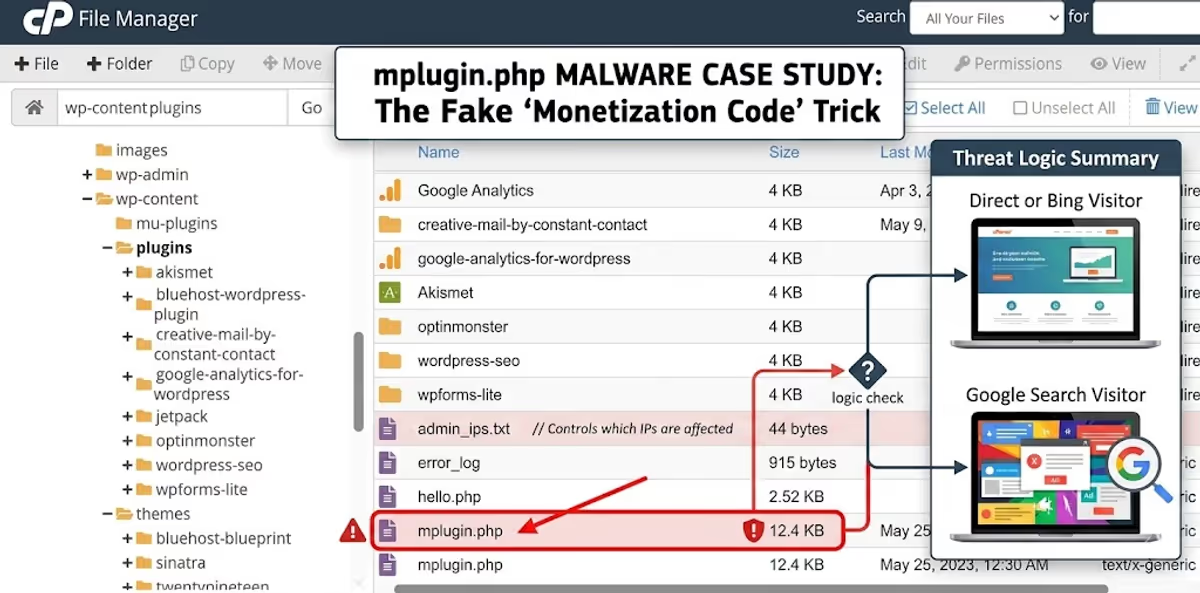
Quick Answer
mplugin.php is a malicious PHP file disguised as a fake WordPress plugin called “Monetization Code plugin” by author “aerin Singh”. It hides itself from the plugins screen, fingerprints administrators by IP, cookie and login state, and injects external JavaScript ads only when a visitor arrives from a search engine (Google, Bing, Yahoo, Yandex, Baidu, MSN, DoubleClick). To remove it you must (1) delete /wp-content/plugins/mplugin.php and admin_ips.txt, (2) clean 11 malicious rows from the wp_options table, and (3) find the original entry-point backdoor — otherwise the file regenerates within minutes.
By MD Pabel — full-stack WordPress security specialist. I’ve cleaned 4,500+ hacked WordPress sites over the last 6 years. This is a real, recent cleanup performed in 2026 on a Bluehost-hosted WordPress site that was bleeding ad revenue to an unknown third party.

/wp-content/plugins/: a 12.4 KB mplugin.php file and a small admin_ips.txt log. Neither file appears on the WordPress Plugins screen.How the infection was first noticed
The client reached out because their Google AdSense account had been throttled and revenue had dropped roughly 60% in three weeks. They could see normal traffic in Google Analytics, but their own ads were getting fewer impressions than expected, and a few visitors had reported “weird pop-up ads” on mobile that the client could not reproduce on his own laptop.
That last detail is the giveaway. If you as the owner can never see the malicious ad but visitors can, you are almost always looking at one of three things on WordPress:
- An
.htaccessmobile redirect — see my walkthrough on fixing WordPress mobile-only spam redirects. - A theme-level header injection — covered in the “Play and Learn” theme-header malware case.
- A fake plugin with administrator cloaking — which is exactly what this case turned out to be.
Logging into the host, I went straight to wp-content/plugins/ via cPanel File Manager. Sitting there, alphabetically after the legitimate plugins, was a single loose file: mplugin.php. WordPress plugins almost always live inside their own folder — a single bare PHP file at this level is suspicious by itself. Next to it was a sibling file called admin_ips.txt that has no business being in a plugins directory at all.
What is mplugin.php? A line-by-line look at the “Monetization Code plugin”

mplugin.php. Two things should already raise flags: error_reporting(0) silences PHP warnings (a classic stealth move), and the “Author” is a generic name with no matching plugins/aerin-singh folder on WordPress.org.The file declares itself as a normal WordPress plugin using a standard plugin header:
/**
 * Plugin Name: Monetization Code plugin
 * Description: mplugin Shows cusom codes to display your ad codes.
 * Author: aerin Singh
 * Version: 1.0
 */
error_reporting(0);
ini_set('display_errors', 0);
$plugin_key='06811d3a8beef5d71ab32f6c47914f21';
$version='1.2';
Notice the typo “cusom” in the description — this exact spelling has been a fingerprint of the malware family since at least 2020, even though the C2 (command-and-control) servers and the embedded ad scripts rotate constantly. The $plugin_key value is a per-victim identifier used by the C2 server to track installations.
What makes the file dangerous is the next 300 lines. The plugin does six distinct things, in this order:
- Registers a settings page at
options-general.php?page=mplugin— but immediately removes that menu item, so even an admin who opens Settings in wp-admin will never see it. - Reports the infected host to
homndo.xyz/o2.php?host=<your-domain>on first run. - Writes default cloaking rules into the
wp_optionstable (the survival kit — more on this below). - Sets an admin-only cookie when a logged-in user loads any page, so future visits from the same browser get skipped.
- Logs the admin’s IP address to a flat file (
admin_ips.txt) and skips it on subsequent visits. - Polls three C2 domains (
homndo.com,homndo.xyz,homndo.top) for code updates and overwrites itself with whatever comes back.
The cloaking trick: why you never see the ads
This is the part of the malware that makes it so effective — and so hard to detect with a security plugin running inside wp-admin.
Buried in the file is this block:
$display_ad='organic';
$search_engines='google.,/search?,images.google., web.info.com,
                 search.,yahoo.,yandex,msn.,baidu,bing.,
                 doubleclick.net,googleweblight.com';
The malicious script is only injected when all of these are true on a given request:
- The visitor is not logged in to WordPress.
- The visitor’s IP is not listed in
admin_ips.txt. - The visitor does not carry the
wordpress_admin_logged_incookie. - The HTTP
Refererheader matches one of the search-engine substrings above — or the visitor carries anorganiccookie set by a previous search-engine visit.
In plain English: the ad code only fires for visitors arriving from Google, Bing, Yahoo, Yandex, Baidu, MSN, DoubleClick or Google Weblight. If you, the site owner, visit your own site by typing the URL directly — nothing happens. If you check the source from your wp-admin tab — nothing happens. If you scan with Wordfence’s public scanner from a known datacenter IP — very often nothing happens, because the IP gets logged on the first scan and excluded on the second.
This is textbook cloaking malware, and it is the same family of evasion technique used in the much larger Essential Plugin supply-chain attack of April 2026, where 31 hijacked plugins served SEO spam only to Googlebot. The economics are identical: keep the site owner blind, keep monetizing the search traffic.
How it fingerprints administrators (three layers)

admin_ips.txt from this victim. Three IPs — the owner’s home connection, his office, and the previous developer’s VPN — were silently recorded over time and excluded from all ad injections.The malware uses three independent layers to recognize and skip the people who would notice the infection:
- Logged-in detection. If
is_user_logged_in()returns true, the ad is suppressed. - Cookie detection. On every admin pageview, a long-lived cookie called
wordpress_admin_logged_inis set for 1000 days on the cookie domain. Even after the admin logs out, this cookie continues to suppress the ads on that browser. - IP detection. Whenever a user with
edit_others_pagescapability (editor or higher) visits the front end, their IP — pulled fromHTTP_CLIENT_IP, thenHTTP_X_FORWARDED_FOR, thenREMOTE_ADDR— is appended toadmin_ips.txt.
That third layer is what creates the file in the screenshot above. On the client’s site, the file had three IPs in it, and yes — one of them was the IP of a developer who had stopped working on the site six months earlier. The malware had been quietly running, watching, and learning, since at least May 2023.
The database fingerprint: 11 rows in wp_options
This is the single most important section of this case study, because deleting mplugin.php from the file system does not remove the malware. The file is a renderer; the configuration lives in the database. If you only nuke the file but leave the database alone, any future dropper — from the same nulled plugin, a backdoor still hiding in the theme, or a reinfection — will pick up exactly where the last one left off, reading the same ad code, the same admin IPs, and the same search-engine list.
I ran the following query to find every option this malware writes:
SELECT * FROM `wp_options`
WHERE `option_name` IN (
  'default_mont_options',
  'ad_code',
  'hide_admin',
  'hide_logged_in',
  'display_ad',
  'search_engines',
  'auto_update',
  'ip_admin',
  'cookies_admin',
  'logged_admin',
  'log_install'
);
wp_options table inside phpMyAdmin. Replace wp_ with your actual table prefix — on this victim it happened to be 36f_.All 11 rows came back. Here is what each one means, why it exists, and what value it holds on a real infection.

autoload is yes on every row — meaning the malicious configuration is loaded into memory on every single WordPress request, even before the site routes to a page.1. ad_code — the actual payload

ad_code option holds the actual JavaScript that gets stitched into every infected pageview. The destination here is daringsupport.com — a known ad-fraud and pop-up network domain.This is the JavaScript that gets appended to the_content filter on single posts and to the wp_footer hook everywhere else. On this victim it pointed to daringsupport.com/c/D.9D6/bA2D5hlJSnWaQf9AN/… — a domain that Scamadviser flags as sharing infrastructure with several low-trust websites. The destination rotates roughly every 4–6 weeks; previously documented variants of this malware have pointed to aanqylta.com, tomndo.com and dozens of other ad-fraud domains.
2. display_ad — the cloaking switch

organic means the ad is shown only to visitors arriving from a recognised search engine. The alternative value all_visitors would expose the infection to everyone, which is too noisy — attackers almost always leave this as organic.3. search_engines — the cloaking allow-list

HTTP_REFERER substrings that count as “organic.” If a visitor’s referer contains any of these, an organic cookie is set for 120 seconds and the ad is rendered on the page.4 & 5. hide_admin and hide_logged_in

hide_admin = on tells the plugin to skip rendering the ad for users it has identified as admins.
hide_logged_in = on extends that suppression to every logged-in WordPress user, including subscribers and customers. The attacker only wants logged-out, search-engine-referred visitors.6, 7 & 8. The three admin-recognition switches

ip_admin = on activates the IP-logging layer — this is what writes to admin_ips.txt.
cookies_admin = on activates the 1000-day wordpress_admin_logged_in cookie that follows the admin even after logout.
logged_admin = on activates the simplest layer: if WordPress reports the visitor as logged in, suppress the ad.All three switches default to on, and the malware uses them as an OR — it only needs one of the three to identify an admin to skip the injection. That redundancy is why scans from a security plugin almost never catch this malware: the very act of being logged in to wp-admin disqualifies your browser from ever seeing the payload.
9. auto_update — how the malware refreshes itself
When auto_update = on, every single front-end pageview triggers a file_get_contents() call to homndo.com/update.php, then homndo.xyz/update.php, then homndo.top/update.php. If any of those responds with a payload that contains the right $plugin_key and a $version= string, the malware overwrites itself with the response. This is how a single infected site can ship a brand-new ad destination overnight without the attacker logging in again.
10. log_install — the first-contact ping

log_install = 1 means the malware has already phoned home to homndo.xyz/o2.php?host=<your-domain> and registered this site in the attacker’s database. Once this row exists, the ping is never sent again.11. default_mont_options
This is the lock that prevents the plugin from re-seeding default values on every load once it has been configured. When it equals on, the plugin skips the bulk update_option() block and trusts the existing values in the database.
The C2 infrastructure (Indicators of Compromise)
Add the following domains and strings to your firewall, host-level hosts file or DNS blocklist. Anything talking outbound to these from your server is almost certainly an infection of this family:
- Ad delivery (rotates):
daringsupport.com,aanqylta.com(older variant) - C2 host registration:
homndo.xyz/o2.php,tomndo.com/o2.php(older variant) - Auto-update endpoints:
homndo.com/update.php,homndo.xyz/update.php,homndo.top/update.php - File artefacts:
wp-content/plugins/mplugin.php,wp-content/plugins/admin_ips.txt - Function names:
salcode_add_plugin_page_settings_mplugin,display_ad_single,display_ad_footer,setting_admin_cookie,file_get_contents_mplugin,hide_plugin_mplugin,getVisIpAddr_mplugin - Plugin key pattern: a 32-character hex MD5-style hash assigned as
$plugin_key(e.g.06811d3a8beef5d71ab32f6c47914f21,9beeedd61661b578d207268250a78846,4ab94009633ce74d72c165d5b5577957— one per campaign) - Plugin-list hider: a function hooked into
pre_current_active_pluginsthat unsetsmplugin.phpfrom$wp_list_table->items
Step-by-step removal (file system + database)
The order of the steps below matters. If you remove the file before you clean the database, the malware can be rewritten by any leftover dropper in the next request and will silently re-seed from the existing options. Always work in this sequence.
Step 1 — Take a full off-site backup
Files and database, downloaded locally, before you touch anything. You will need this for forensic comparison if anything goes wrong. If you do not already have a process for this, my walkthrough of backing up WordPress with UpdraftPlus covers it end to end.
Step 2 — Block outbound traffic to the C2 domains
If you have access to your host’s firewall (Cloudflare, BunnyCDN, ConfigServer Firewall) add outbound deny rules for daringsupport.com, homndo.com, homndo.xyz, homndo.top and tomndo.com. This buys you time and prevents the malware from auto-updating itself mid-cleanup.
Step 3 — Delete the file artefacts
rm /home/USER/public_html/wp-content/plugins/mplugin.php
rm /home/USER/public_html/wp-content/plugins/admin_ips.txt
If your host blocks SSH, use cPanel File Manager and right-click → Delete on both files.
Step 4 — Clean the 11 rows from wp_options
Replace wp_ with your actual table prefix (check wp-config.php for the $table_prefix value). On the victim in this case study it was 36f_.
DELETE FROM `wp_options`
WHERE `option_name` IN (
  'default_mont_options',
  'ad_code',
  'hide_admin',
  'hide_logged_in',
  'display_ad',
  'search_engines',
  'auto_update',
  'ip_admin',
  'cookies_admin',
  'logged_admin',
  'log_install'
);
Run that statement in phpMyAdmin’s SQL tab or via wp db query if you have WP-CLI access. You should see 11 rows deleted — if you see fewer, run the SELECT query first to see which ones are missing so you can confirm they were never created on this site.
For a deeper walkthrough of how to safely diff and edit a WordPress database when malware lives in it, I recommend reading my complete WordPress database malware guide.
Step 5 — Hunt for the dropper (this is the step everyone skips)
The mplugin.php file did not arrive by itself. Something put it there. In 90% of the cases I have cleaned this is one of two things:
- A nulled premium plugin or theme — usually a slider, page builder, or LMS plugin downloaded from a “free download” site. The reasons this is so common, and how to spot them, are covered in my full breakdown of nulled plugins and themes.
- A persistent backdoor hiding inside an otherwise legitimate plugin, theme
functions.php, or mu-plugins directory. The patterns to look for are walked through in this case study of a hidden backdoor.
On this client’s site I traced the dropper to a nulled copy of a premium WooCommerce extension that the previous developer had installed. It contained an eval() chain that wrote mplugin.php back to disk whenever any front-end page was hit. Removing the WooCommerce extension and replacing it with the licensed version was what finally stopped the regeneration.
Quick triage commands you can run over SSH:
# Find any other suspicious files that look like droppers
grep -rEl "homndo\.(com|xyz|top)|daringsupport\.com|aerin Singh" /path/to/wp-content/

# Find PHP files that write themselves
grep -rEl "file_put_contents\(__FILE__" /path/to/wp-content/

# Look for the tell-tale plugin-hiding function pattern
grep -rEl "pre_current_active_plugins" /path/to/wp-content/
Step 6 — Rotate every credential and lock the door
- Change the WordPress admin password for every user with editor-or-higher role.
- Change the database password in
wp-config.php. - Change your hosting, cPanel and FTP passwords.
- Generate fresh WordPress salts and paste them into
wp-config.php— this force-logs-out every existing session, including any rogue admin. - Run my hidden admin user audit against your
wp_userstable.
Step 7 — Re-check from a clean IP and a search-engine referer
The only way to confirm cloaking malware is gone is to test like an attacker, not like an admin. From a phone on mobile data (so your IP is different from any logged office IP), open Google, search for your own brand, click through to the site, and view the page source. Then do the same with curl:
curl -A "Mozilla/5.0" -e "https://www.google.com/" https://yoursite.com/ | grep -iE "daringsupport|homndo|aerin"A clean site returns nothing.
Why your security plugin missed this
This is the question almost every client asks once the cleanup is finished, especially the ones who were paying for Wordfence Premium or a similar paid solution. There are three honest answers:
- Signature gap. The file is small (12.4 KB), is not obfuscated, and looks structurally identical to any number of legitimate WordPress plugins. Static signature scanners that flag base64 or
eval()chains see nothing here. - It hides itself from the plugins screen. The
pre_current_active_pluginshook removes the row before WordPress ever renders it, so a scan that only walks WordPress’s in-memory plugin list misses it entirely. - The cloaking is point-of-view-dependent. A scanner running inside wp-admin is a logged-in user, so the malware skips the injection during the scan. A scanner running from a fixed IP (like Wordfence’s scan servers) gets that IP logged into
admin_ips.txton the first run and silenced thereafter.
I’ve written more about why this whole class of malware survives standard scanners in why WordPress malware keeps coming back, and about why even paid scanners often miss reinfection in what most website owners miss after 4,500 cleanups.
How to prevent this specific malware family
The single biggest predictor of an mplugin.php infection across the sites I have cleaned is the presence of one or more nulled or cracked premium plugins/themes. The second biggest is an outdated PHP version (7.4 or older) combined with no file-modification monitoring. The cheap fixes:
- Remove every nulled or pirated plugin/theme. If you cannot afford the licensed version, find a free alternative on the official WordPress.org repository. The pricing of one premium plugin is almost always less than the cost of one professional malware cleanup.
- Add the line
define('DISALLOW_FILE_MODS', true);towp-config.phpon production. This stops any plugin or theme from writing new files towp-content/plugins/, which kills the regeneration vector cold. - Use a host-level file-integrity monitor. Most managed hosts include this for free; if yours doesn’t, see my SiteGround review for why I recommend it for high-risk sites.
- Harden your login surface using the steps in my WordPress login hardening guide.
- Run a real security plugin and configure it — the field-tested options are in my best WordPress security plugins guide.
And of course, follow the broader checklist in how to secure a WordPress site.
FAQ
What is mplugin.php and is it dangerous?
mplugin.php is a malicious WordPress file disguised as a fake plugin titled “Monetization Code plugin” by author “aerin Singh”. Yes, it is dangerous: it injects third-party JavaScript advertisements into your visitors’ pages, steals ad impressions from your site, can drop your Google Search rankings if Google detects the injected ads, and acts as a foothold for further compromise via its auto-update mechanism.
Why can’t I see the ads on my own site?
Because the malware fingerprints you in three ways — your WordPress login status, a long-lived cookie, and your IP address — and explicitly skips injecting the ad for anyone it has identified as an administrator. The ads only render for logged-out visitors whose HTTP Referer contains a search engine name (Google, Bing, Yahoo, Yandex, Baidu, MSN, DoubleClick or Google Weblight).
Why doesn’t mplugin.php appear in my WordPress plugins screen?
The file hooks into the pre_current_active_plugins action and unsets its own entry from the WordPress plugin list table before the page renders. So even though the file is sitting in /wp-content/plugins/, the wp-admin Plugins screen pretends it does not exist. You can only see it via FTP, SSH, or the file manager in your hosting control panel.
I deleted mplugin.php but it came back — why?
You only removed the renderer, not the dropper. Something else on your site — almost always a nulled plugin or theme, or a backdoor in a legitimate plugin/theme’s PHP file — is rewriting mplugin.php back to disk. You have to find and remove that dropper, and you also need to clean the 11 malicious wp_options rows so the regenerated file has no configuration to read from.
How did the malware get onto my site in the first place?
In 90% of the infections I’ve cleaned in this family, the entry point is a nulled premium plugin or theme downloaded from a “free download” site. The remaining 10% are old, unpatched vulnerabilities in legitimate plugins/themes or compromised admin credentials.
Will Google penalize my site for hosting this malware?
Yes, eventually. Google specifically penalizes sites that show different content to Googlebot vs. real users (cloaking) and sites that serve third-party ads via injected JavaScript without owner consent. If you have already seen unfamiliar keywords appear in Google Search Console or experienced sudden ranking drops, run the cleanup immediately, then submit a reconsideration request following the steps in my blacklist recovery guide.
Can a security plugin like Wordfence or Sucuri remove mplugin.php?
Modern signatures from both vendors will flag the file once they see it — but as I explained above, getting them to see it is the hard part because of the admin-cloaking. Even after they remove the file, they often miss the 11 wp_options rows and the original dropper. For a hands-on cleanup with full post-clean hardening, see my WordPress malware removal service.
Need a hand cleaning this up?
If you found mplugin.php on your own site and you’d rather have a professional clean it — including the database rows, the dropper, the rotated credentials, and the post-clean hardening — that’s exactly what I do.
I’ve cleaned 4,500+ hacked WordPress sites and I offer a fixed-price WordPress malware removal service with a 30-day reinfection guarantee. You can also see other cleanups in my case studies or hire me directly for one-on-one work.
Average turnaround: 4–24 hours for a typical site, including verification from a clean external IP.
Related reading on mdpabel.com
- Comprehensive list of known fake and malicious WordPress plugins
- wp-compat plugin: the hidden backdoor in your WordPress site
- How to detect WordPress malware
- WordPress database malware: the complete guide
- I found a hidden backdoor in a client’s WordPress site
- The real security risks of nulled WordPress plugins and themes
- How I caught and removed hidden malware hijacking Google traffic