Most requested
WordPress Malware Removal
Manual cleanup for hacked WordPress sites, backdoors, fake plugins, redirects, PHP malware, and hidden persistence.
Starting at
$89
Manual file cleanup
Backdoor check
Post-cleanup hardening
Starter Offer: WordPress Malware Cleanup From $89 — limited availability Claim on WhatsApp →
Hi, I'm MD Pabel. Since 2018, I've worked as an independent WordPress security specialist, cleaning hacked sites for business owners, agencies, freelance-platform clients, and direct referrals. If your WordPress site is redirecting to spam, blacklisted by Google, or showing fake verification pages, I investigate the files, database, users, plugins, themes, and server rules manually — then close the source so the malware does not come back.
I help hacked WordPress site owners recover from malware redirects, Japanese SEO spam, fake CAPTCHA popups, suspicious PHP files, hidden backdoors, database injections, blacklist warnings, hosting suspensions, and reinfections. The work is manual: I look beyond scanner alerts and check where attackers usually hide persistence, including plugins, themes, uploads, admin users, cron jobs, .htaccess, and database options.
These are the malware patterns I see most often while cleaning hacked WordPress sites for clients.
Spam Japanese URLs in Google, cloaked pages, and index pollution from sengoku/jasabacklink injections.
Read the cleanup guideFake Cloudflare verification, "I'm not a robot" popups, and HSEO/ClearFake JavaScript injectors.
Read the cleanup guidePharmaceutical spam injections, hidden links, casino/matbet redirects, and SERP defacement.
Read the cleanup guideJavaScript and .htaccess redirects sending visitors to spam, gambling, or malicious sites.
Read the cleanup guideHidden mobile-only redirects, search engine cloaking, and rewrite-rule injections.
Read the cleanup guideObfuscated PHP, fake plugins (wp-compat, hseo), hidden admin users, and reinfection persistence.
Read the cleanup guideGreek text injections, fetch malware, hidden options, and SQL-level persistence.
Read the cleanup guideWP-Cron persistence and self-regenerating malware that comes back after every cleanup.
Read the cleanup guideWhite screen of death, fatal PHP errors, broken admin, and post-malware recovery.
Read the cleanup guideFixed-price cleanup options for hacked WordPress sites, fake CAPTCHA malware, SEO spam, blacklist warnings, and broken website emergencies.
Manual cleanup for hacked WordPress sites, backdoors, fake plugins, redirects, PHP malware, and hidden persistence.
Starting at
Remove fake Cloudflare verification, fake reCAPTCHA, “I’m not a robot” popups, and malicious JavaScript injections.
Starting at
Clean Japanese keyword hack, spam URLs in Google, cloaked pages, pharma spam, casino spam, and index pollution.
Starting at
Recover from McAfee, Norton, Avast, browser warnings, antivirus blocks, and website reputation issues after cleanup.
Per vendor
Fix “Deceptive Site Ahead,” hacked site warnings, unsafe site alerts, and Google Safe Browsing review issues.
Starting at
Fix fatal PHP errors, plugin conflicts, white screen issues, broken updates, and WordPress admin/frontend crashes.
Starting at
Not sure which service you need?
If your WordPress site is hacked, redirecting, showing fake verification, blacklisted, or broken, start with a manual inspection.
Check if your WordPress site is blacklisted by Google Safe Browsing, Chrome, McAfee, Norton, Avast, Quttera, or other security vendors.
My cleanup process is built around finding the real infection source, not only deleting the files a scanner reports.
Snapshot the current state, scan every PHP/JS file, audit the database, review .htaccess, list admin users, and identify the entry point.
Remove malicious files, decode obfuscated PHP, clean injected database rows, restore core/plugin files, and delete unauthorized admins.
Reset all credentials, enforce 2FA, fix file permissions, remove unused plugins/themes, and patch the original vulnerability.
Submit Google Search Console review, request blacklist delisting, remove spam URLs from index, and monitor for reinfection.
The 4,500+ cleanup number comes from years of real client work across freelance platforms, agency support, direct website owners, and referrals.
"I'm very satisfied with MD Pabel service. He saved my site from hackers and removed all malware attacks. Highly Recommended."
"My website was suffering from some redirect malware. MD was able to take care of the problem for a reasonable fee. For me, he was a lifesaver. I will certainly go to him first should something like that happen again."
"Thanks for giving me great support. You are a very nice team and the cleanup was thorough."
Detailed writeups from real hacked WordPress sites, including symptoms, findings, cleanup steps, and recovery notes.
Removed Matbet SEO spam injections at scale and restored Google rankings without losing legitimate content.
Read full case studyWordPress homepage replaced with a gambling site — full forensic cleanup and reputation recovery.
Read full case studyBluehost suspended the account; restored hosting access, cleaned every file, and lifted the 403 lockout.
Read full case studyFull Japanese keyword hack cleanup with Search Console URL removal and re-indexing strategy.
Read full case studyI bring platform-vetted expertise directly to you. Save on platform fees by working with me directly.
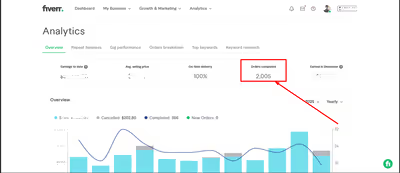
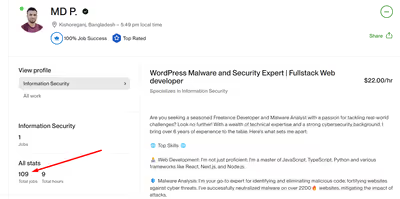
Get the same 5-star service, without the platform fees.
Real answers to the questions hacked-site owners ask me every day.
Send me your URL and a short description of the issue. I will check the symptoms, tell you what looks suspicious, and suggest the next step for cleanup, blacklist recovery, or reinfection prevention.
4,500+ cleanups since 2018 · Manual review · Malware removal and hardening