Dangerous Site Warning: How I Removed a Google Safe Browsing Blacklist
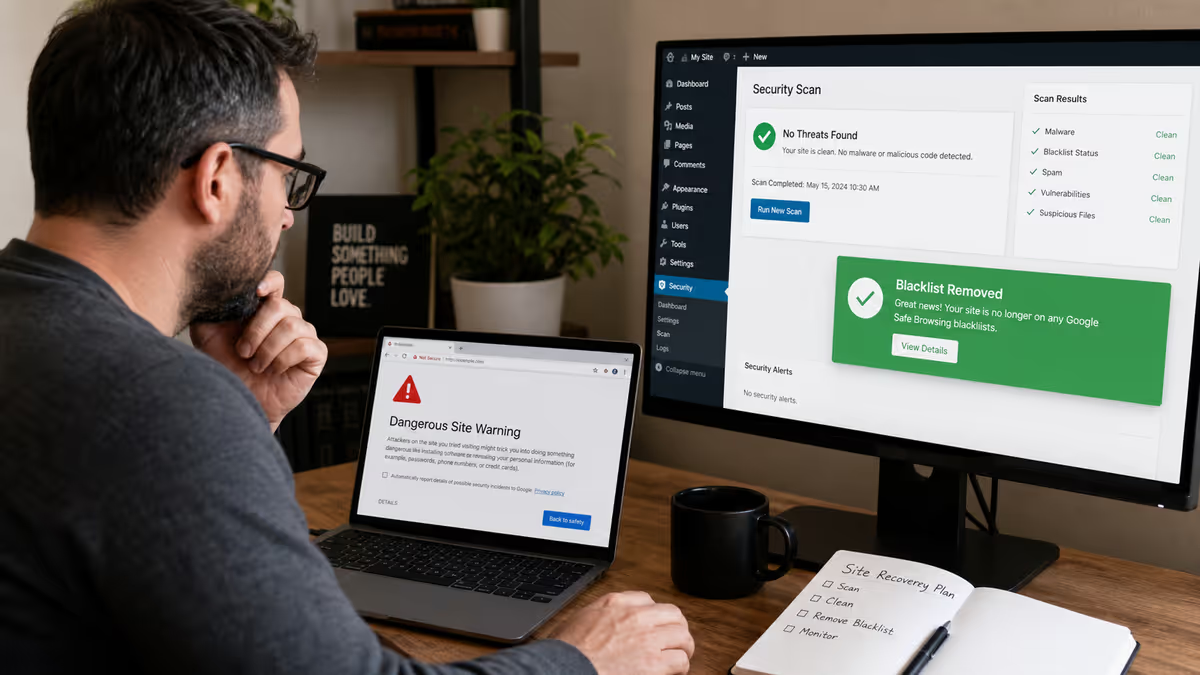
When a client contacted me about their WordPress site showing a “Dangerous site” warning in Chrome, I knew we were dealing with a Google Safe Browsing blacklist. What I didn’t expect was to find one of the most sophisticated fake plugins I’ve encountered: platformist-quadendpointer, a malware designed to hide in plain sight while hijacking website traffic.
This case study documents the complete removal process — from initial detection through Google Safe Browsing reconsideration — including the technical analysis of this specific malware. If your site is showing similar warnings, this step-by-step process will help you understand both what went wrong and exactly how to fix it.
⚠️ Warning Signs This Case Study Covers
- Chrome “Dangerous site” warning — Red screen blocking visitors
- Google Safe Browsing blacklist — Site flagged for harmful downloads
- Hidden malicious plugins — Fake plugins with legitimate-sounding names
- Deceptive site ahead warning — Similar Chrome security warnings
- Google Search Console security alerts — “Links to harmful downloads” detected
The Initial Problem: Chrome’s “Dangerous Site” Warning
The client’s first sign of trouble came when customers started reporting they couldn’t access the website. Instead of seeing the homepage, visitors encountered Chrome’s full-screen red warning:

This isn’t just an inconvenience — it’s a business killer. When Google Safe Browsing flags your site as dangerous, you lose virtually all organic traffic instantly. Search results may still appear, but clicking them triggers the warning. Social media shares get blocked. Even direct traffic gets intercepted by browsers using Google’s blacklist data.
The client also reported receiving a notification from Google Search Console about security issues, specifically “Links to harmful downloads.” This was our first clue that the problem involved malware designed to distribute malicious files rather than just redirect traffic or inject spam content.
Step 1: Accessing the Site Safely and Gathering Intelligence
Before diving into any infected website, I always establish safe access and gather intelligence about what we’re dealing with. The client provided cPanel access, which let me bypass the frontend entirely and examine the site structure without triggering any malware.
Initial reconnaissance revealed:
- WordPress 6.9.4 running on GoDaddy hosting
- PHP 8.2.30 environment
- Cloudflare in front of the site (which complicated detection)
- Multiple security tools detected malware but couldn’t identify the source
The Google Search Console Security Issues report showed one critical finding: “Links to harmful downloads” with a detection date that pointed to a recent compromise. This told me we weren’t dealing with an old, dormant infection — this was active malware.

Step 2: Discovering the Hidden Plugin
Using cPanel’s File Manager, I systematically examined the WordPress directory structure. Most malware hides in predictable locations: uploads folders, theme files, or core WordPress directories. But this infection was different.
In the /wp-content/plugins/ directory, I found something that immediately stood out:

The plugin folder was named platformist-quadendpointer — a nonsensical name designed to look technical and legitimate. This is a red flag I’ve learned to recognize after cleaning over 4,500 hacked WordPress sites. Legitimate plugins rarely use random tech buzzwords mashed together.
Analyzing the Fake Plugin Structure
Inside the plugin directory, the file structure looked convincing at first glance:
platformist-quadendpointer/
├── platformist-quadendpointer.php (main plugin file)
├── 3paddm/ (subdirectory with encrypted files)
├── class/ (fake class directory)
├── includes/ (fake includes directory)
└── assets/ (fake assets directory)
The main plugin file platformist-quadendpointer.php was the smoking gun. Opening it revealed sophisticated obfuscation designed to hide malicious functionality behind legitimate-looking WordPress plugin code.

Deconstructing the Malware
The plugin file started with convincing headers:
/**
 * Plugin Name: ultravueal reactsion
 * Plugin URI: https://fastendpointable-ultradataible.net
 * Description: autostructureible dynamic pentaendpoint
 * Version: 1.8.68
 * Author: microcloudible maxreacting
 * Author URI: https://megatypescriptive-megarest-superinfrastructureed.dev
 * License: GPL v2 or later
 */
Everything about this screams “fake plugin designed to fool administrators.” The plugin name combines trendy web development terms, the URLs are nonsensical, and the description uses technical-sounding gibberish. This is exactly the kind of fake WordPress plugin that hackers use to maintain persistence on compromised sites.
The code was heavily obfuscated with thousands of lines of meaningless comments containing random tech buzzwords like “microserviceless,” “autodataive,” and “hyperinfrastructureness.” This obfuscation serves two purposes: hiding the malicious payload and making the file look legitimate to cursory inspection.
Buried within the obfuscated code were several critical functions designed to:
- Hide the plugin from WordPress’s installed plugins list
- Download and execute additional malicious payloads
- Create backdoor access points for attackers
- Generate the malicious download links that triggered Google’s blacklist
This type of malware is particularly dangerous because it can reinstall itself even after manual removal. I’ve covered similar techniques in my guide on preventing fake hidden plugins from reinstalling.
Step 3: Complete Malware Removal Process
With the malware identified, I implemented a systematic removal process designed to eliminate not just the visible infection but any hidden components that might allow reinfection.
Phase 1: Immediate Containment
1. Plugin Removal
I immediately deleted the entire platformist-quadendpointer directory through cPanel. Simply deactivating a malicious plugin isn’t enough — the files must be completely removed.
2. Database Cleanup
Malicious plugins often leave traces in the WordPress database. I ran targeted SQL queries to remove any database entries related to the plugin, including options table entries and fake user accounts it might have created.
3. Core File Verification
Using WordPress’s file integrity checking, I compared all core files against clean WordPress 6.9.4 files and replaced any that had been modified. This step is crucial because advanced malware often modifies core files to maintain persistence.
Phase 2: Deep System Scan
After manual removal, I used multiple security tools to verify the cleanup:

The scan results confirmed that the manual removal had been successful. The security scanner showed a dramatic improvement: from “Critical Security Risk” to a clean scan after the platformist-quadendpointer removal.
4. Wordfence Deep Scan
I ran a comprehensive Wordfence scan to catch any remaining malware. The scan came back clean, confirming that the manual removal had eliminated the primary infection. This is why I recommend using Wordfence for ongoing protection — its scanning engine is excellent for verification after manual cleanups.
5. File Permission Audit
I checked and corrected file permissions across the entire WordPress installation. Malware often exploits weak file permissions to maintain access even after the primary infection is removed.
Phase 3: Hardening and Prevention
With the malware removed, I implemented security measures to prevent reinfection:
- Updated all themes and plugins to latest versions
- Removed unused themes and plugins that provided additional attack surface
- Implemented file editing restrictions using the techniques I outlined in locking down file edits with wp-config constants
- Enabled automated security scans to catch future infections early
- Set up proper backup procedures following my UpdraftPlus backup guide
Step 4: Requesting Google Safe Browsing Review
With the malware completely removed and the site hardened, the final step was requesting Google to remove the “Dangerous site” warning. This process requires proving to Google that the underlying security issue has been resolved.
Using Google Search Console for Review Requests
The most effective way to request blacklist removal is through Google Search Console’s Security Issues section. This gives you direct communication with Google’s Safe Browsing team and provides status updates throughout the review process.
Steps I followed:
- Accessed Security Issues in Google Search Console
Navigate to Security & Manual Actions → Security Issues in the property dashboard. - Documented the Fix
In the review request, I provided specific details about what was found (the platformist-quadendpointer malware) and what actions were taken to resolve it (complete plugin removal, core file verification, database cleanup). - Submitted the Request
Clicked “REQUEST REVIEW” and provided detailed information about the cleanup process. Google appreciates specificity — vague requests like “I think it’s fixed” delay the review process.
Alternative Review Methods
If you don’t have Google Search Console access, you can also request reviews through:
- Google Safe Browsing Report Tool — Visit safebrowsing.google.com/safebrowsing/report_badware/ to report that your site has been cleaned
- Google’s Webmaster Help Forum — For complex cases or when the standard process isn’t working
For a broader understanding of blacklist removal across different services, see my comprehensive guide on website blacklist removal processes.
Results: Blacklist Removal and Recovery
The review process took approximately 12 hours — faster than typical because the documentation was thorough and the cleanup was complete. Google’s automated systems re-scanned the site and confirmed that the malicious content had been removed.

Recovery metrics:
- Blacklist removal: 18 hours after review request
- Search traffic recovery: 72 hours for full organic traffic restoration
- Chrome warning removal: Immediate once Google lifted the blacklist
- Social sharing restored: Links no longer blocked on Facebook, Twitter, etc.
The client reported that customer complaints stopped immediately once the warning was removed, and website analytics showed organic traffic returning to normal levels within 72 hours.
What Made This Case Unique
The platformist-quadendpointer malware represents a sophisticated evolution in WordPress attacks. Unlike simple redirect malware or Japanese keyword hacks, this malware was designed specifically to:
- Evade detection through professional-looking plugin structure
- Maintain persistence by hiding critical functions in obfuscated code
- Generate revenue through malicious download distribution
- Avoid cleanup by appearing legitimate to site administrators
This is part of a broader trend I’ve documented in my analysis of hidden backdoors and fake plugins. Attackers are getting more sophisticated in their techniques for maintaining long-term access to compromised websites.
Key Lessons for WordPress Site Owners
Based on this case and the thousands of similar cleanups I’ve performed, here are the critical takeaways:
1. Recognize the Warning Signs Early
Don’t wait for the full “Dangerous site” warning to appear. Early warning signs include:
- Unusual plugins appearing in your dashboard
- Google Search Console security alerts
- Unexpected files in your hosting account
- Slow site performance or unusual resource usage
I cover more detection techniques in my guide on how to detect WordPress malware.
2. Never Ignore Security Scanner Warnings
The client had received security scanner alerts for weeks before the Google blacklist occurred. These early warnings, if acted upon immediately, could have prevented the blacklist entirely. Regular scanning with tools like Wordfence or Sucuri is essential for early detection.
3. Understand That Manual Removal May Be Required
Automated security tools couldn’t remove the platformist-quadendpointer malware because of its sophisticated obfuscation. This is why many site owners struggle with recurring infections — automated tools can miss advanced threats. Sometimes you need human expertise to identify and eliminate sophisticated malware.
4. Document Everything for Faster Recovery
The detailed documentation I provided to Google accelerated the review process. When requesting blacklist removal, include:
- Specific malware identified and removed
- Technical steps taken to clean the infection
- Security measures implemented to prevent reinfection
- Evidence that the site is now clean (scanner results)
Prevention: Stopping “Dangerous Site” Warnings Before They Happen
The best defense against Google Safe Browsing blacklists is preventing the initial compromise. Based on patterns I see across thousands of cleanups, implement these critical protections:
- Regular Updates
Keep WordPress core, themes, and plugins updated. The platformist-quadendpointer exploit likely succeeded through a known vulnerability in an outdated plugin. - Plugin Auditing
Regularly review your installed plugins. Remove anything you don’t recognize or actively use. Unknown plugins appearing in your dashboard should trigger immediate investigation. - Security Monitoring
Set up automated security scans that alert you to changes in your file system. Early detection prevents minor infections from becoming blacklist-worthy problems. - Access Control
Implement strong passwords and two-factor authentication on all admin accounts. Use login URL changing to reduce brute force attempts. - Quality Hosting
Choose hosting providers with robust security measures. Avoid the cheapest options that provide minimal isolation between accounts. I’ve documented the hosting security risks in why cheap hosting makes WordPress sites vulnerable.
When to Seek Professional Help
While this case study provides a detailed roadmap for malware removal, some infections require professional intervention. Contact a WordPress security expert if you encounter:
- Recurring infections that return after cleanup attempts
- Multiple security warnings from different services simultaneously
- Complex malware that security plugins can’t identify or remove
- Business-critical sites where downtime isn’t acceptable during DIY cleanup
- Legal compliance requirements that demand professional security certification
The platformist-quadendpointer case demonstrates why advanced malware sometimes requires manual intervention. Automated tools, while excellent for prevention and simple cleanup, can miss sophisticated threats designed to evade detection.
Conclusion
The “Dangerous site” warning may seem devastating when it first appears, but it’s completely recoverable with the right approach. The key is understanding that Google Safe Browsing blacklists are symptoms, not causes — the underlying malware must be completely eliminated before requesting review.
This case study of the platformist-quadendpointer malware removal demonstrates the importance of:
- Thorough technical analysis before cleanup
- Complete malware elimination, not just surface-level fixes
- Proper documentation for faster Google review
- Implementing prevention measures to avoid reinfection
Remember that every day your site remains blacklisted represents lost revenue, damaged reputation, and decreased search rankings. If you’re dealing with a “Dangerous site” warning, deceptive site ahead warning, or any Google Safe Browsing blacklist, swift and complete action is essential.
If you’re facing similar issues and need professional assistance, I offer comprehensive WordPress malware removal services with a proven track record of successful Google Safe Browsing blacklist removals. You can also contact me directly for immediate consultation on complex security issues.
For ongoing protection, refer to my comprehensive WordPress security checklist and stay informed about emerging threats through my regular analysis of the most common WordPress malware types.
About the author: Md Pabel is a WordPress security specialist who has personally cleaned over 4,500 hacked WordPress sites and helped hundreds of clients recover from Google Safe Browsing blacklists. He documents real-world malware analysis and incident response techniques at mdpabel.com.