simplecopseholding.com Malware on WordPress: How to Remove the SocGholish “Play and Learn” Redirect
⚡ Quick Answer
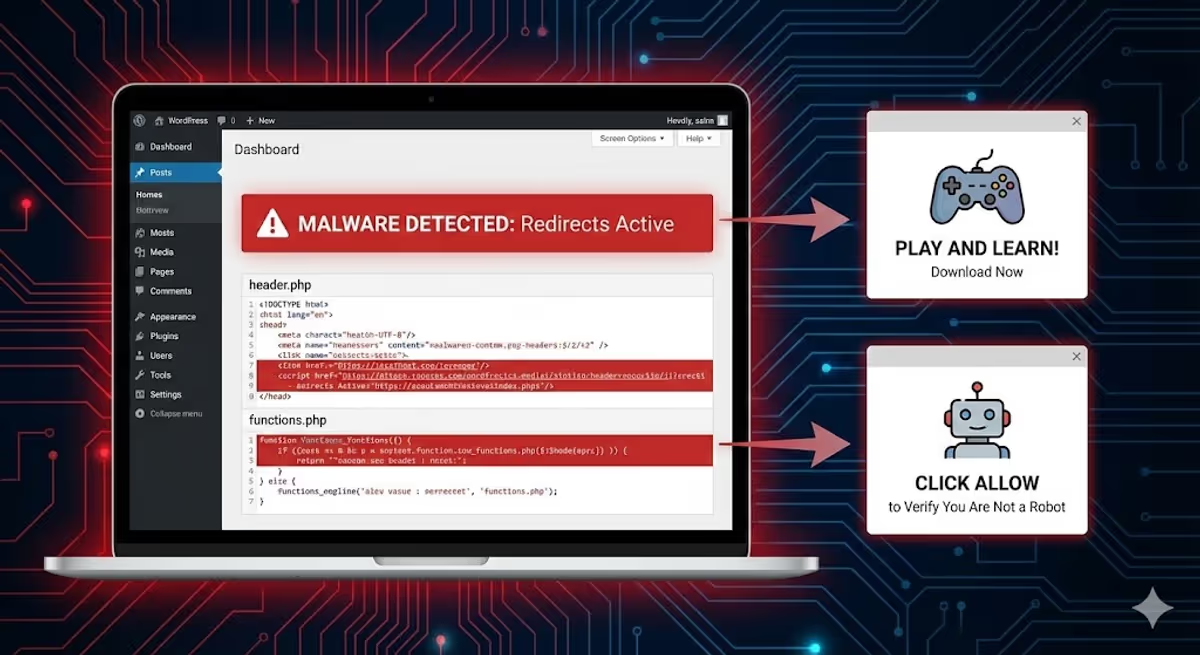
simplecopseholding.com is a malicious domain used by the SocGholish (TA569) malware family — the same threat actor linked to LockBit, Evil Corp, and even Russia’s GRU Unit 29155. If your WordPress site redirects visitors to simplecopseholding.com, exovandria.shop, secretplans.discoveryment.my.id, a fake “Play and Learn” subscription page, or a “Click Allow to Verify You Are Not a Robot” prompt — you have this infection.
To remove it:
- Search your
header.php,footer.php,functions.php, and rootindex.phpfor the stringsimplecopseholdingor adns-prefetchtag pointing to it. - Delete the malicious script block and the
dns-prefetchline. - Hunt for the backdoor (usually a fake plugin like
either-interopable-blobor a roguedb.php). - Reset all admin passwords and rotate hosting/FTP credentials.
- Submit a Google Search Console review to clear the “Dangerous Site” warning.
If the redirect comes back within minutes of cleaning — you missed the backdoor. Get a manual cleanup here.
You open your website, and for a split second, it looks normal. Then the screen flashes, and a visitor on mobile gets redirected to a spam page asking them to “Click Allow to Verify You Are Not a Robot“ — or a fake “Play and Learn” subscription page that charges them daily.
You log in as admin. Everything looks fine. Plugins look clean. Wordfence finds nothing.
The problem isn’t a setting — it’s a sophisticated piece of malware hiding in your theme’s most critical files: header.php, footer.php, or even the core index.php. And it has a name most security plugins won’t tell you: SocGholish.
I’ve cleaned this exact infection from dozens of WordPress sites this quarter. This guide is the field-tested removal process — including the technical fingerprints, the backdoor locations, and the post-cleanup checklist most articles skip.

What Is the simplecopseholding.com Malware? (And Why It’s More Dangerous Than You Think)
simplecopseholding.com isn’t just “a spam domain.” Threat intelligence platforms including ANY.RUN and Joe Sandbox have tagged it with three specific labels: ta569, apt, and socgholish.
Here’s what those tags mean in plain English:
- SocGholish (also called FakeUpdates) is a JavaScript-based malware family that has been active since 2017. It compromises legitimate websites and uses them to deliver fake browser update prompts to visitors.
- TA569 is the threat actor that operates SocGholish as a “Malware-as-a-Service” platform — they sell access to compromised sites to other criminal groups.
- APT means Advanced Persistent Threat — this is not a script-kiddie infection. SocGholish has been linked to Evil Corp, LockBit ransomware, RansomHub, Dridex, and Russia’s GRU Unit 29155.
Translation: when your WordPress site is redirecting visitors to simplecopseholding.com, your site has been silently rented out as initial-access infrastructure for serious criminal operations. Every visitor you send there could be infected with ransomware, credential stealers, or a remote-access trojan.
This is also why the malware is so hard to detect with default scanners — TA569 deliberately rotates domains and uses Traffic Distribution Systems (Parrot TDS, Keitaro TDS) to filter who sees the redirect and who doesn’t.

The Symptoms: How to Confirm You Have It
This malware is engineered to hide from you, the site owner. It uses cookies, User-Agent detection, and referrer checks to behave differently for different visitors:
- You (logged in as admin): See a perfectly normal site.
- Returning visitors on desktop: Often see nothing — the cookie has already “burned” them.
- First-time visitors on mobile (especially from Google): Get redirected to scam domains.
- Google Safe Browsing crawlers: Detect the redirect and flag your site as “Dangerous Site Ahead”.
Known Redirect Destinations (Same Campaign, Different Domains)
Because TA569 rotates domains constantly, you may see any of the following — they’re all the same infection:
| Domain | Lure / Payload |
|---|---|
simplecopseholding.com |
Generic SocGholish C2 / drive-by download |
exovandria.shop |
“Click Allow” push-notification scam |
secretplans.discoveryment.my.id |
“Play and Learn” subscription scam |
analyticacnodec.com / analytwave.com |
Same family, different rotation — see my malware log entry |
metricaltic.com / analyticanoden.com |
SocGholish variants observed mid-2025 |
If your site redirects to any of these, the cleanup process below applies.
The Code: What the Injection Actually Looks Like
Unlike the database-injected variant of redirect malware (covered in my JavaScript redirect malware guide), this version writes itself directly into your theme files as what looks like a “harmless font loader.”
Look for this exact block — pulled from a real client cleanup last week:
<script>
(function() {
    var wf = document.createElement('script');
    wf.src = 'https://ajax.googleapis.com/ajax/libs/webfont/1.5.3/webfont.js';
    wf.type = 'text/javascript';
    wf.async = 'true';
    var s = document.getElementsByTagName('script')[0];
    s.parentNode.insertBefore(wf, s);
})();
</script>
<link rel='dns-prefetch' href='//simplecopseholding.com' />
Why this design is so effective:
- The decoy: The legitimate Google Webfont script makes the block look “performance-related” to security scanners and to anyone skimming the file.
- The payload: The real weapon is the
<link rel='dns-prefetch'>tag. It tells the visitor’s browser to silently warm up a DNS connection to the attacker’s server. This is what enables the lightning-fast redirect — by the time the page renders, the browser is already talking to the SocGholish infrastructure. - No JavaScript event needed: Most “bad code” detectors look for
window.location,eval(), or obfuscated strings. Adns-prefetchtag looks completely benign to them.
⚠️ Don’t Wait on This One
If Chrome is already showing visitors a “Dangerous Site Ahead” warning, Google Safe Browsing has flagged your domain. Every hour the malware stays live is another hour of organic traffic loss, ad rejection risk, and potential blacklisting across other engines.
How to Remove the SocGholish Redirect (File-by-File Cleanup)
I’ll walk you through the four locations this malware lives in, in the order I check them on a real cleanup. Before you touch anything: take a full backup (files + database) so you have a rollback point.
1. Check header.php (Where 70% of Infections Live)
This file is loaded on every front-end page, which is why it’s the attacker’s first choice.
- Path:
/wp-content/themes/your-active-theme/header.php - Quick fix: Go to Appearance → Theme File Editor → Theme Header (header.php).
- What to look for: The script block above, usually injected just before the closing
</head>tag. Delete the<script>block and thedns-prefetchline.
2. Check functions.php (The “Persisting” Variant)
If you delete the code from header.php and it reappears within minutes — congratulations, you have the persistent variant. The malware has hooked itself into functions.php and rewrites the header on every page load.
- Path:
/wp-content/themes/your-active-theme/functions.php - What to look for: Strange functions with random names like
x8s7_load_fonts(),wp_optimize_init(), ortheme_perf_loader(), attached to thewp_headhook withadd_action(). - Tell-tale sign: If you see the string
simplecopseholding,exovandria, or any base64-encoded blob inside that function — delete the entire function and itsadd_actionline.
3. Check footer.php
Hackers know seasoned admins check the header first. So sometimes they hide the same payload right above the closing </body> tag.
- Path:
/wp-content/themes/your-active-theme/footer.php - What to look for: The same
dns-prefetchpattern. Delete it.
4. Check the Root index.php (The “Pre-WordPress” Variant)
If the redirect happens even when you switch themes, the infection is sitting outside the theme — in WordPress’s root index.php.
- Path:
/index.php(root of your WordPress install — not the one inside/wp-admin/). - Clean baseline: A genuine WordPress
index.phpis about 17 lines long. It contains a copyright comment andrequire __DIR__ . '/wp-blog-header.php'; - Infected version: A giant wall of obfuscated JavaScript or PHP at the top — sometimes 100+ lines of base64-encoded garbage before the legitimate WordPress bootstrap.
- Action: Replace the file with a clean copy from a fresh WordPress download of the same version.
Why the Malware Keeps Coming Back: Hunting the Backdoor
Here’s the part that catches most DIY cleaners off guard: removing the visible malware doesn’t fix anything if the backdoor is still there. SocGholish operators always plant a “regenerator” — a hidden file that re-injects the redirect every few minutes.
I wrote a full breakdown of why WordPress malware keeps coming back, but for this specific campaign the backdoor is almost always one of these:
Common SocGholish Backdoor Locations
- Fake plugin folder:
/wp-content/plugins/either-interopable-blob/— the plugin is hidden from the WP admin UI but visible via FTP. See my list of known malicious plugins. - Fake DB helper:
/wp-content/themes/your-theme/db.php— themes don’t ship with adb.php, so any file with that name is malicious. - Disguised core file:
/wp-includes/css/style.php— there’s no legitimate PHP file in/wp-includes/css/. - Spoofed admin file:
/wp-admin/user-login.php— looks like core, isn’t. - Mu-plugin loader:
/wp-content/mu-plugins/index.php— must-use plugins auto-load on every request, making them a dream backdoor location.
I documented a full backdoor hunt with code samples in “I found a hidden backdoor in a client’s WordPress site”. The pattern is identical here.
Post-Cleanup: The Steps Most Articles Skip
Even after you’ve removed the malware and the backdoor, you’re not done. SocGholish typically gets in via stolen admin credentials or a vulnerable plugin, which means the door is still open. Run through this checklist:
- Reset every admin password. Force a logout of all sessions via Users → All Users → Edit → “Log out everywhere.”
- Audit your admin accounts. SocGholish operators often add a stealth admin user. Check
wp_usersin phpMyAdmin for any account you don’t recognize. - Rotate hosting + FTP + database passwords. If the attacker had file write access, assume they grabbed your
wp-config.phpcredentials. - Update every plugin, theme, and WordPress core. The initial entry point was almost certainly an unpatched plugin.
- Scan your
.htaccessfile. Sometimes a secondary.htaccessredirect rule is left behind. See my .htaccess malware guide. - Submit a review request to Google Search Console. Under Security & Manual Actions → Security issues. Reviews typically clear within 72 hours if the malware is truly gone.
- Check other blacklists. Sucuri SiteCheck, Norton Safe Web, McAfee SiteAdvisor, Quttera. My full blacklist removal walkthrough covers each one.
How SocGholish Got In (And How to Keep It Out)
Across the simplecopseholding.com cleanups I’ve done, the entry point fell into one of three buckets:
- Vulnerable plugin (~60% of cases). Outdated form plugins, page builders, or membership plugins are the top vectors. Patchstack and Wordfence advisories almost always predict the next wave.
- Compromised hosting account (~25%). Especially shared hosting where one infected site spreads laterally to others under the same cPanel.
- Stolen admin credentials (~15%). Phishing emails impersonating WordPress, plus weak passwords without 2FA.
Hardening your site doesn’t have to be expensive. The non-negotiables:
- Two-factor authentication on every admin account.
- Auto-updates enabled for plugins and core.
- A real-time file integrity monitor (Wordfence, MalCare, or my own scanning routine).
- Daily off-site backups — not just on the same server.
I cover the full stack in how to secure a WordPress site.
Real Cleanups, Real Clients
“My website was suffering from some redirect malware. MD was able to take care of the problem for a reasonable fee. For me, he was a lifesaver. I will certainly go to him first should something like that happen again.”
— Kendall Miller, Founder ⭐⭐⭐⭐⭐
“I’m very satisfied with MD Pabel’s service. He saved my site from hackers and removed all malware attacks. Highly Recommended ❤️”
— Hassan Infinkey, eCommerce Owner ⭐⭐⭐⭐⭐
If you’d rather skip the file diving and have someone who’s cleaned 4,500+ hacked WordPress sites handle it for you:
Frequently Asked Questions
What is simplecopseholding.com?
simplecopseholding.com is a malicious domain operated as part of the SocGholish (FakeUpdates) malware campaign run by threat actor TA569. Compromised WordPress sites silently redirect visitors to this domain, where they are served fake browser update prompts, push-notification scams, or paid subscription traps like “Play and Learn.”
Is simplecopseholding.com a virus?
The domain itself is the delivery infrastructure — not a virus. The danger is what it loads after the redirect: drive-by downloads, credential-stealing JavaScript, and in some campaigns, ransomware loaders for groups like LockBit and RansomHub.
Why does the redirect only happen on mobile?
SocGholish uses User-Agent detection and Traffic Distribution Systems (TDS) to filter visitors. Mobile browsers and first-time visitors arriving from Google search are the highest-value targets, so the malware activates the redirect only for them. Logged-in admins are explicitly excluded so the site owner doesn’t notice. I covered this in my mobile-only redirect case study.
What is the “Play and Learn” redirect?
“Play and Learn” is a mobile subscription scam delivered by SocGholish. The page tries to trick mobile users (often on carrier billing in South and Southeast Asia) into subscribing to a paid daily service — for example, “5.05 BDT Validity 1 Day.” Charges appear on the visitor’s mobile bill, not their credit card, which is what makes it lucrative for the attackers.
Why is my site showing “Dangerous Site Ahead” in Chrome?
Google Safe Browsing detected the redirect to a known malicious domain and flagged your entire site. After cleaning the malware, you have to request a security review in Google Search Console under Security & Manual Actions → Security issues. Reviews typically take 24–72 hours.
Will restoring a backup fix it?
Maybe — but be careful. SocGholish backdoors often sit on a site for weeks before the visible redirect activates. A backup from three days ago likely contains the same backdoor. Restoring it just resets the clock. Cleaning the live files is usually safer.
Can Wordfence remove this malware?
Wordfence’s free signature scanner often misses the SocGholish injection because the visible code (the Google Webfont loader) is legitimate-looking, and the dns-prefetch tag isn’t a flagged pattern. Premium scanners with heuristic engines do better, but a manual review is still required to find the backdoor.
How long does cleanup take?
For an experienced cleaner with file/server access, a single SocGholish infection takes 2–4 hours including the post-cleanup hardening. The Google blacklist review then takes another 24–72 hours. DIY cleanups stretch into days because the backdoor hunt is the hard part.
Can it happen again?
Yes — if you don’t close the entry point. SocGholish operators maintain a list of every site they’ve previously compromised and re-test old vulnerabilities. Patching plugins, rotating credentials, and adding 2FA are mandatory.
Still Seeing the Redirect After Cleaning?
If you’ve followed every step above and the redirect still triggers — there’s a backdoor you haven’t found yet. Common hiding spots: encoded inside an uploads/ image, disguised as a favicon, or living inside the wp_options table.
I trace these every week. If you’d rather not, send me your URL and I’ll find the source within hours.


